
P&ID to Native SOLIDWORKS Assembly with Feature Tree
Turn P&ID intent, customer part-library context, BOM data and engineering rulepacks into a reviewable native SOLIDWORKS assembly proposal with feature-tree context, mates, BOM context and validation notes.

MST scopes P&ID-to-native-SOLIDWORKS as a reviewable engineering automation workflow: interpretation, mapping and proposal generation are prepared for qualified engineers, who retain geometry, safety, manufacturability, rule compliance and release acceptance.
Check if your P&ID workflow is pilot-ready.
Describe the module boundary, tag conventions, BOM expectations, approved part-library policy and desired SOLIDWORKS output. Keep customer drawings and rulepacks for NDA-controlled exchange.
MST is a purpose-built P&ID-to-native-SOLIDWORKS workflow for process-equipment teams that need reviewable native assembly proposals from P&ID intent. The workflow uses customer part-library context, BOM/tag data, spatial constraints, feature-tree structure, mates and rulepack validation. The output is not a release substitute; customer engineering review and normal CAD release controls remain required.
Designed for semiconductor gas panels, UHP gas delivery modules, fluid delivery skids and repeated P&ID-driven equipment assemblies.From diagram intent to editable assembly structure
The useful result is not a render, mesh or one-way STEP file. The target package is a native SOLIDWORKS assembly proposal with component structure, mates, feature-tree context, tag traceability, BOM context and validation notes that an engineer can inspect.
NeuroBox D connects P&ID symbols, tags, BOM references and approved SOLIDWORKS part libraries into a reviewable native assembly proposal. The workflow is constrained by customer part-library policy, mate and routing assumptions, assembly-step planning and rule checks, so engineers can inspect the output before release.

Workflow From P&ID to Assembly
The workflow is intentionally different from generic text-to-CAD. It combines diagram structure, customer libraries, engineering rules and reviewable validation.
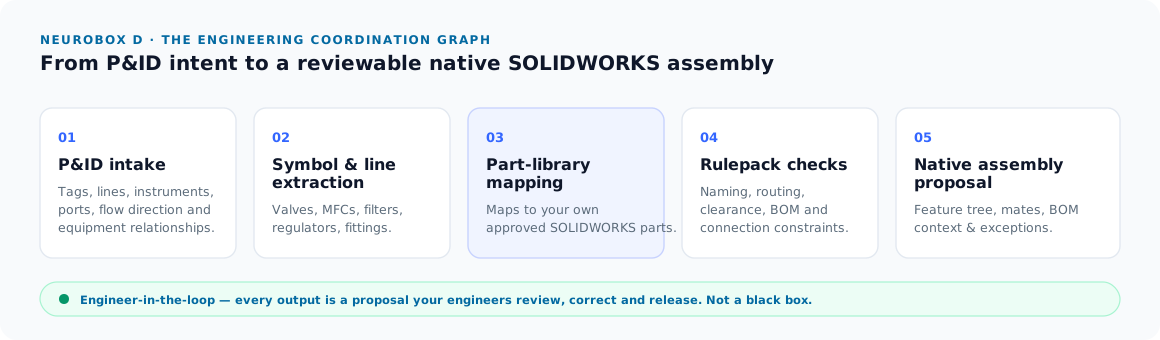
P&ID intake
Read tags, lines, instruments, ports, flow direction and equipment relationships from the process diagram and supporting lists.
Symbol and line extraction
Resolve valves, MFCs, filters, regulators, fittings, panels, tubing and ambiguous diagram symbols into structured entities.
Part-library mapping
Map entities to the customer's preferred parts and standards instead of forcing a generic built-in component library.
Rulepack checks
Apply naming, routing, clearance, BOM, connection, orientation and review rules as explicit machine-checkable constraints.
Native assembly proposal
Generate a SOLIDWORKS assembly proposal with feature-tree context, mates, BOM context and exceptions for engineering review.
Output Package
The value is in the assembly structure and review trail, not just in 3D geometry.
Native SOLIDWORKS structure
Editable components, subassemblies and feature-tree context that stay useful inside the customer's CAD workflow.
Connection and routing context
Assembly relationships are represented as reviewable context instead of being collapsed into presentation geometry.
Customer part mapping
Parts can be mapped to preferred valves, fittings, MFCs, regulators, tubing, panels and standard components.
Tag and quantity context
P&ID tags, component identities and BOM context remain visible for review and procurement handoff.
Rulepack validation
Routing, clearance, naming, fitting, subassembly and customer convention checks are surfaced as validation notes.
Engineer-controlled release
Generated output is meant for review, correction and approval through the customer's normal release process.
Why your own parts and rulepacks matter
Gas panels and process modules are rarely solved by generic CAD blocks. Equipment teams care about approved MFC models, VCR fitting standards, tube sizes, valve families, panel conventions, naming rules, BOM policies and service-access constraints.
MST's workflow is designed around those customer-specific inputs so the result is closer to an engineering review package and less like a concept model that must be rebuilt manually.
Best-Fit Applications
The first pilot should be a repeated subsystem where the team already has known parts, conventions and review criteria.
Semiconductor gas panels
Repeated symbols, UHP gas line conventions, controlled part libraries and clear tag-to-component relationships.
UHP gas delivery modules
MFCs, regulators, valves, filters, VCR fittings, C-seal and W-seal choices that need traceable review.
Fluid delivery skids
Standard pumps, filters, sensors, fittings, BOM-driven assembly workflows and repeated product variants.
How It Differs From Common Alternatives
This page should help engineers place the workflow correctly: it is not a generic image-to-3D converter and not a one-click release tool.
AI text-to-CAD demos
Useful for fast concept geometry, but often weak on customer part libraries, P&ID tag traceability, rulepacks, mates and release review.
Rules-based CAD automation
Strong when rules and templates are stable, but usually requires structured input and significant upfront configuration.
MST design-automation workflow
Targets the intersection of P&ID understanding, customer libraries, rulepack validation and reviewable native SOLIDWORKS assembly output.
P&ID to native SOLIDWORKS guide cluster
Use these focused guides to compare tools, prepare a non-confidential intake brief, and understand what must stay engineer-reviewed before any native SOLIDWORKS assembly proposal can be useful.
P&ID to SOLIDWORKS Assembly: Feature Tree vs STEP Export
Why native assembly structure, mates and feature-tree context matter more than neutral geometry export.
Read guide ->What Inputs Are Needed for P&ID to SOLIDWORKS Assembly Generation?
The P&ID, BOM, part-library, spatial-envelope and rulepack inputs needed before automation is reviewable.
Read guide ->AI P&ID to SOLIDWORKS for Gas Panel Design Automation
How gas-panel diagrams, tags, MFCs, valves and fittings become a structured native assembly proposal.
Read guide ->P&ID to SOLIDWORKS Automation: Market Landscape and MST Position
Where MST fits against plant design, CAD review and computational-design tools.
Read guide ->How AI Handles Symbols, BOM Context and Mates in P&ID to SOLIDWORKS
A public explanation of symbol extraction, BOM mapping, mate context and review exceptions.
Read guide ->Engineering Value of P&ID to Native SOLIDWORKS Assembly Generation
Why the workflow targets senior-engineer review time, BOM discipline and repeatable equipment modules.
Read guide ->Why AI Text-to-CAD Cannot Produce Production-Oriented SOLIDWORKS Assemblies
The difference between prompt geometry and reviewable native assembly structure.
Read guide ->P&ID to 3D Using Your Own SOLIDWORKS Part Library
How customer-approved parts, naming rules and BOM fields keep output useful inside real CAD workflows.
Read guide ->Smap3D Alternative: AI P&ID to Native SOLIDWORKS Assembly
A comparison page for teams evaluating whether they need plant design or a narrower assembly-automation path.
Read guide ->UHP Gas System Design Terms for P&ID to SOLIDWORKS Automation
The UHP gas and component terms that must be visible before mechanical automation can be trusted.
Read guide ->SEMI F82 and Surface-Mount Gas Stick Scoping Checklist
Surface-mount gas stick assumptions to verify before a CAD-automation pilot.
Read guide ->P&ID vs 3D Model Check: Design Rule Validation Before SOLIDWORKS Review
How P&ID intent can be checked against 3D layout, naming, BOM and routing expectations.
Read guide ->As-Built Verification for P&ID and Native SOLIDWORKS Assemblies
How redlines, field changes and as-built verification affect generated assembly review.
Read guide ->DriveWorks, Tacton and Rules-Based CAD Automation vs AI P&ID Assembly Generation
A comparison between configured CAD automation and P&ID-driven interpretation plus exception handling.
Read guide ->MFC, VCR Fittings and Valve Layout: BOM Context for Gas Panel Automation
Why MFC, VCR fitting and valve-layout choices need to travel with BOM and CAD context.
Read guide ->Semiconductor Equipment Parts Sourcing: VCR, MFC, Valves, Seals and Vacuum Components
Adjacent sourcing context for gas-panel and process-equipment parts.
Read guide ->Obsolete Part and Alternative Sourcing for Semiconductor Equipment BOMs
How alternate part sourcing affects BOM review and downstream assembly assumptions.
Read guide ->BOM Consolidation, Custom Drawing Parts and Export Logistics for Semiconductor Equipment RFQs
How BOM consolidation and custom drawing parts connect engineering automation to RFQ follow-through.
Read guide ->Evaluate one P&ID-driven assembly first.
Send a representative workflow and we will map what can be automated, what must stay engineer-reviewed, and what library or rulepack inputs are needed for native SOLIDWORKS assembly output.