
GDS/OASIS Handoff Manifest: What to Inventory Before Controlled Delivery
A GDS/OASIS handoff manifest is a file-level inventory for controlled delivery after the correct NDA, PDK and review route are in place.
- →Answer-first summary
- →Where the manifest sits in the MPW flow
- →What a GDS/OASIS manifest should inventory
- →Sample manifest section
- →Public-intake boundary
Answer-first summary
A GDS/OASIS handoff manifest is a controlled file inventory, not a public intake form. It should be prepared only when the MPW route, NDA path, PDK context and transfer instructions are clear. The manifest lists what is being delivered, which version is intended for review, which checks have been run and which files are excluded from the transfer.
MST’s GDS/OASIS Handoff Manifest Generator helps teams prepare that inventory without uploading files. The tool is useful after a case has moved beyond no-GDS screening and before a controlled design-package exchange.
Where the manifest sits in the MPW flow
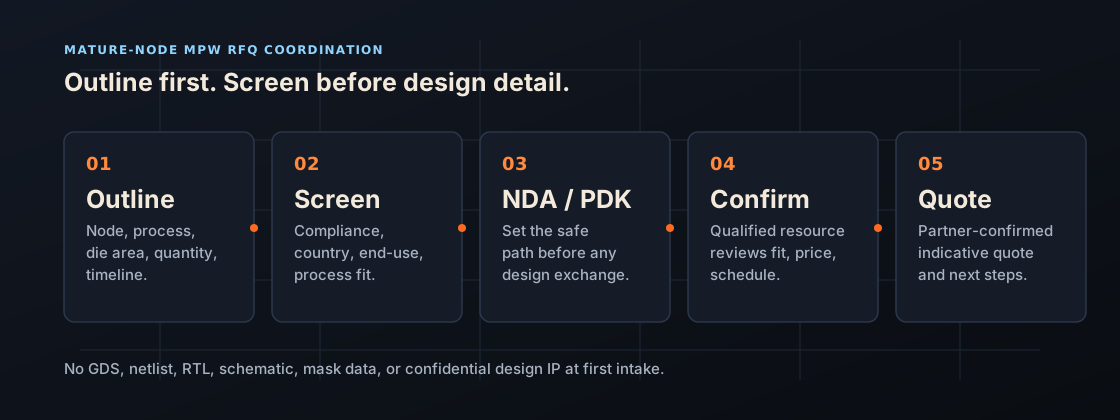
The manifest comes after the first RFQ brief and readiness screen. A practical sequence is: non-confidential intake, process-fit review, customer and end-use screening, NDA/PDK path clarification, package/test scope, then controlled handoff preparation. The manifest should not be used to skip the earlier gates.
This matters because mature-node MPW projects often involve multiple parties: customer, design team, MST, partner route, package/test provider and sometimes legal or compliance reviewers. A manifest prevents file confusion when the project eventually reaches a controlled exchange.
What a GDS/OASIS manifest should inventory
Design package identity
- Project code or neutral project name
- Layout format: GDSII or OASIS
- Top-cell name
- Layout version and date
- Owner of the release decision
File-level handoff items
- Main layout file name and checksum
- Layer map or stream-out map reference, where permitted
- DRC summary and deck version reference
- LVS summary and deck version reference
- Antenna, density, ERC or reliability checks if applicable
- Seal ring, pad ring and scribe assumptions
- Waiver list or open issue list
Package and test context
- Die size and pad opening assumptions
- Package family, pin count and orientation notes
- Probe card or wafer-probe requirements if known
- Final-test expectations and first-silicon bring-up notes
Sample manifest section
Release inventory
| Item | Example entry |
|---|---|
| Top cell | MS_SENSOR_TOP |
| Layout format | GDSII, compressed archive |
| Release version | Rev A3, intended for partner technical review |
| DRC/LVS status | Clean against named deck version, with waiver list attached if permitted |
| Excluded files | Source RTL, foundry PDK files, private IP source and unrelated customer files |
Public-intake boundary
The manifest generator does not require file upload. Teams should not send GDS/OASIS files, PDK folders, design source, private IP, model files or confidential customer documents through a public contact form. A manifest can be drafted locally first and then used after the correct controlled transfer path is identified.
How MST uses a manifest
MST uses the manifest to reduce ambiguity when a route is ready for controlled design-package handling. It helps confirm which file version is under discussion, what signoff evidence exists, what package/test assumptions depend on the layout and what partner response is being requested. Start with the GDS/OASIS Handoff Manifest Generator only when the project is beyond public no-GDS intake.
Related Articles



Ready to scope your run?
Send node, process family, die area, volume and timeline - no design IP. We screen it, route to a qualified partner, and return an indicative quote.