What Inputs Are Needed for P&ID to SOLIDWORKS Assembly Generation?
A practical checklist for starting a P&ID-to-native-SOLIDWORKS review: diagram quality, part library, BOM fields, spatial envelope, rulepack and output expectations.
- →The minimum intake package
- →Why the part library is so important
- →What does AI extract from the P&ID?
- →What can be sanitized for a first review?
- →Common intake problems
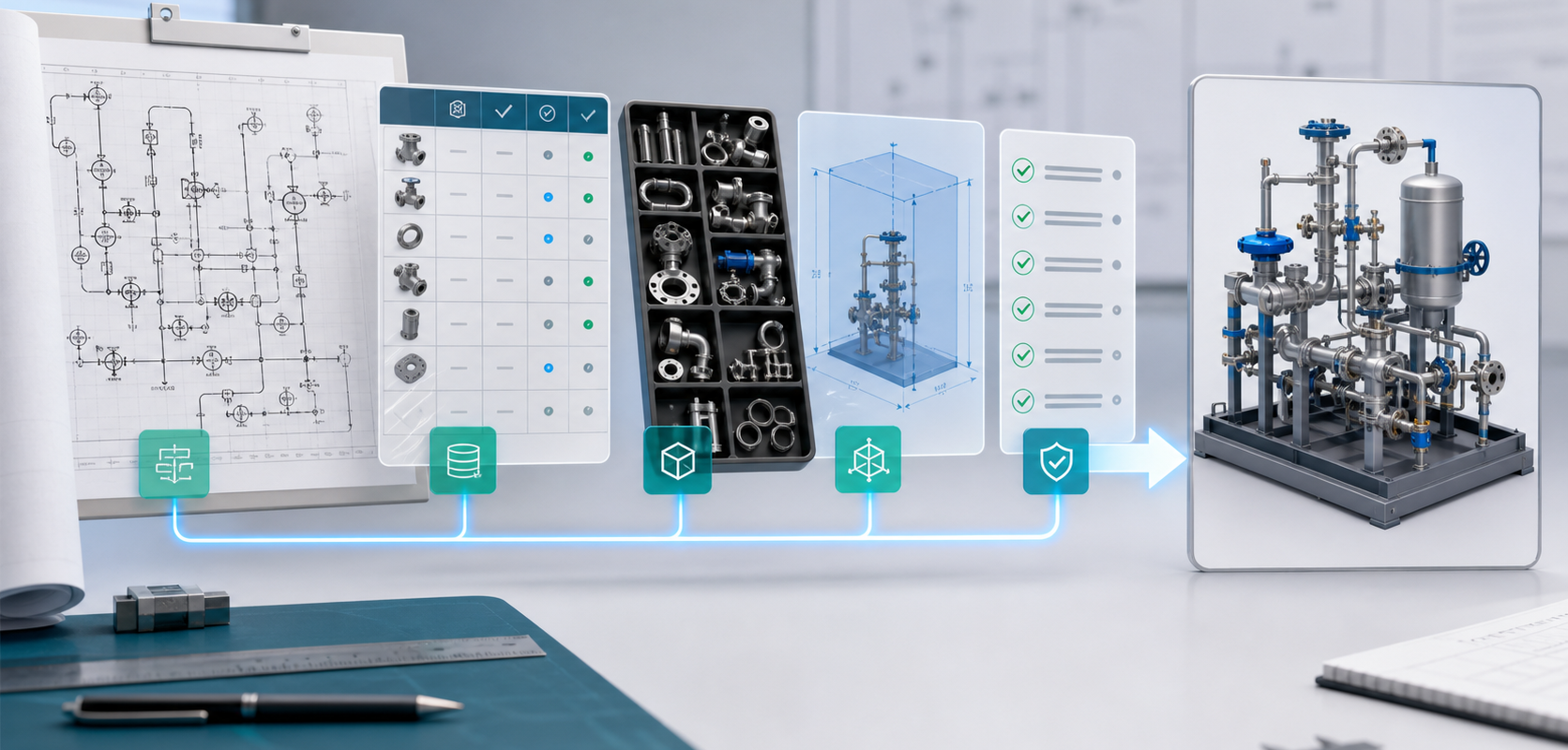
Answer block: A useful P&ID-to-SOLIDWORKS request should include the P&ID, equipment type, expected assembly scope, component or part library, BOM fields, port and connection assumptions, spatial envelope, routing constraints, SOLIDWORKS version and validation rules. The first review does not need to expose confidential customer data if a representative sample can show the symbols, tag conventions and assembly standard.
Many teams ask whether AI can generate a native SOLIDWORKS assembly from a P&ID. The honest answer is: it depends on the quality of the engineering context. A P&ID is a process diagram, not a complete mechanical model. It describes what connects to what, but it rarely contains every dimensional, purchasing and spatial decision needed to build a useful CAD assembly.
That is why MST treats intake as an engineering scoping step. The goal is to understand whether the P&ID, part data and customer standards can support a native assembly output with feature tree, component hierarchy, mates, BOM context and reviewable exceptions.
The minimum intake package
For a first feasibility read, prepare these items:
- Representative P&ID: a real or sanitized diagram that shows symbols, tags, instrument loops and connection style.
- Equipment type: gas panel, gas box, skid, wet process module, cabinet, chemical delivery unit or another target system.
- Assembly scope: whether the target is a full system, one panel, a gas stick, a module, or a reusable subassembly template.
- Part-library status: existing SOLIDWORKS parts, supplier models, internal standard parts, or placeholder requirements.
- BOM fields: part number, manufacturer, description, material, rating, size, quantity, revision and procurement notes.
- Spatial envelope: panel size, cabinet boundary, keep-out zones, mounting plane, service access and preferred orientation.
- Rules: customer standards, clearance rules, routing preferences, port orientation rules and validation expectations.
- CAD target: SOLIDWORKS version, file naming convention, subassembly structure and release package expectations.
Why the part library is so important
A common mistake is to treat P&ID-to-3D generation as a pure drawing-recognition task. The drawing is only one input. The part library determines whether a symbol can become a real valve, regulator, gauge or fitting inside a native assembly.
If the library is clean, automation can preserve customer-specific standards. If the library is missing or inconsistent, the system should mark placeholders and ask for review. This is not a weakness. It is how engineering automation avoids silently creating false precision.
What does AI extract from the P&ID?
At the public workflow level, the system looks for engineering intent: symbols, tags, line connections, equipment boundaries, loops, component classes, port relationships and BOM hints. It then connects that intent to available part data, rulepack expectations and target assembly structure.
The exact model logic is not public. What matters for a customer is the reviewable result: a proposed assembly structure, a mapped component list, a BOM context, and an exception list that identifies ambiguous symbols, missing parts or rule conflicts.
What can be sanitized for a first review?
If the drawing is sensitive, the first review can use a sanitized or representative sample. Keep the information that affects automation quality:
- Symbol shapes and tag patterns.
- Connection conventions.
- Example component classes.
- Expected BOM columns.
- Example part-library naming.
- Spatial and rule constraints.
Remove customer names, project names, proprietary process parameters and confidential operating details if they are not needed for feasibility review.
Common intake problems
- The P&ID is a raster scan with unclear symbols and no consistent tag structure.
- The same symbol is used for multiple physical components.
- The BOM is maintained separately and does not match tags in the diagram.
- The team wants native SOLIDWORKS output but has no accepted part-library standard.
- Routing and clearance rules are tribal knowledge held by one senior engineer.
FAQ
Can MST start without the final P&ID?
Yes, for feasibility scoping. A representative sample can show whether the symbol and part-library workflow is reviewable.
Is a PDF enough?
A PDF may be enough for initial review if it is legible and symbol conventions are consistent. Better source data improves the workflow.
Do we need to share proprietary process details?
Not for the first review unless those details affect component selection or engineering constraints. MST can start with a non-sensitive sample.
What is the output of the first review?
A practical readiness view: what can be mapped, what part data is missing, what rulepack assumptions need confirmation and what output scope is realistic.
Use the P&ID to Native SOLIDWORKS Assembly page as the checklist before sending a review request.
Need a native SOLIDWORKS assembly?
Send the P&ID scope, part-library expectations, rulepack boundary and target assembly output. MST reviews whether the case is suitable for native assembly generation with feature tree, mates and BOM context.