- →What the SOLIDWORKS API is good at
- →What the SOLIDWORKS API is bad at
- →Where AI changes the cost curve
- →The decision rubric
- →A real cost comparison
Mechanical engineering teams keep hitting the same wall. They want to automate the tedious parts of SOLIDWORKS work — pattern-based assemblies, BOM extraction, drawing version comparison — and the obvious answer is the SOLIDWORKS API. Then six months and 4,000 lines of VBA later, the macro breaks because somebody renamed a feature, and the original developer has left the company.
This article is a direct comparison between writing custom SOLIDWORKS API automation and using AI-driven tools like DrawingDiff. No marketing. The goal is to give you a decision rubric you can defend in front of your engineering manager.
What the SOLIDWORKS API is good at
The SOLIDWORKS API exposes roughly 8,000 methods across IModelDoc2, IAssemblyDoc, IFeatureManager, and dozens of other interfaces. For deterministic, structured tasks, it is excellent.
Good fits for solidworks api automation include:
- Generating production drawings from a fixed assembly template (drive parameters from Excel, regenerate views, save PDF).
- Renaming files according to a PLM convention.
- Exporting STEP/IGES in a consistent unit system.
- Validating that every part has material assigned and a custom property
PARTNUMfilled in. - Mass-updating sheet metal gauge across 500 part files when a vendor changes spec.
These tasks share a property: the input is structured (an Excel row, a folder of .sldprt files), the rules are explicit, and the output is verifiable. A determined engineer with two weeks of focused time can write a robust macro for any of these.
A typical SOLIDWORKS API snippet
Here is a cut-down VBA example that batch-exports STEP files from an assembly. Real production code will be 5x longer because of error handling.
Dim swApp As SldWorks.SldWorks
Dim swModel As SldWorks.ModelDoc2
Dim swAssy As SldWorks.AssemblyDoc
Dim vComps As Variant
Dim i As Long

Set swApp = Application.SldWorks
Set swModel = swApp.ActiveDoc
Set swAssy = swModel
vComps = swAssy.GetComponents(True)

For i = 0 To UBound(vComps)
    Dim swComp As SldWorks.Component2
    Set swComp = vComps(i)
    Dim swCompModel As SldWorks.ModelDoc2
    Set swCompModel = swComp.GetModelDoc2
    If Not swCompModel Is Nothing Then
        Dim outPath As String
        outPath = Replace(swCompModel.GetPathName, ".SLDPRT", ".step")
        swCompModel.Extension.SaveAs outPath, 0, 0, Nothing, 0, 0
    End If
Next i
This works. It will keep working for years if nobody touches it. But notice what it does NOT do: read intent. It cannot look at a P&ID and figure out which valves and pumps belong in the assembly. It only operates on a model that already exists.
What the SOLIDWORKS API is bad at
The API breaks down when:
- Input is unstructured. A scanned P&ID PDF, a hand-marked redline, an email from a customer with a sketch attached. None of this fits into
IModelDoc2.GetCustomInfo(). - Rules have exceptions. “Use this 2-inch flange… unless the line is high purity, then use the tri-clamp variant.” Encoding all exceptions in IF/THEN macros becomes unmaintainable past about 30 rules.
- The library evolves. SOLIDWORKS releases break behavior. We have a client whose 2017-era macro for view placement quietly stopped placing center marks in 2023 because of a default setting change in
IDrawingDoc. - Multiple file formats. Reading an AutoCAD .dwg from inside SOLIDWORKS API is awkward. Reading a Smap3D piping export is worse. Reading a vendor’s IGES with naming convention you do not control is the worst.
- Visual reasoning. Detecting that a P&ID symbol is a check valve versus a globe valve requires looking at the drawing, not parsing structured data.
This is precisely the territory where AI tools live.
Where AI changes the cost curve
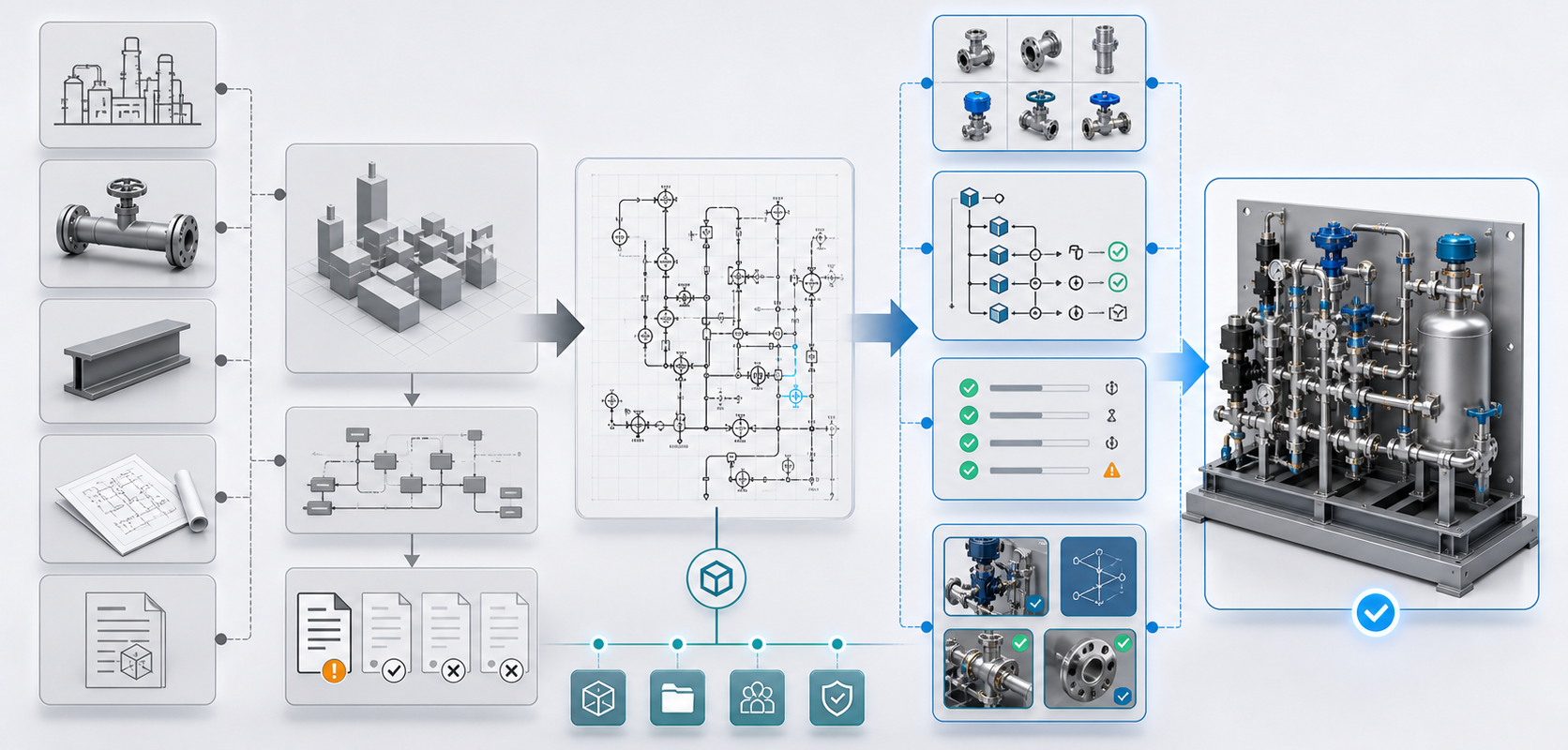
AI does not replace the SOLIDWORKS API. It replaces the human who reads the drawing and decides what to do. Consider a workflow where a customer sends a P&ID for a new chemical skid:
| Step | Manual + API only | AI-assisted |
|---|---|---|
| Read P&ID, identify equipment list | 4-6 hours human | 2-5 minutes AI extraction |
| Map symbols to internal part library | 2-4 hours human | 1-3 minutes AI suggestion + 30 min review |
| Build SOLIDWORKS assembly skeleton | 6-12 hours human + macros | 5-15 minutes AI orchestrates API calls |
| Pipe routing between equipment | 8-16 hours human | 30-60 minutes AI proposes, engineer adjusts |
| Generate BOM and drawing pack | 2-3 hours via API macro | 10 minutes via API macro (unchanged) |
The last row is important. The boring, deterministic parts (drawing pack generation, BOM export, file naming) stay in the SOLIDWORKS API world because that is where they belong. The judgement-heavy parts move to AI.
This is roughly how DrawingDiff is architected internally — the AI does the perception and intent extraction, then it drives the SOLIDWORKS API through pre-validated automation primitives. You do not throw your existing macros away.
The decision rubric
Use the SOLIDWORKS API directly when:
- Your input is already a SOLIDWORKS file or a clean Excel/CSV.
- You can write the rules in fewer than 200 lines of pseudocode.
- The same workflow runs more than 50 times per year (otherwise the dev cost does not amortize).
- You have an in-house developer who knows COM and can maintain across SOLIDWORKS versions.
Use AI tooling when:
- Input arrives as PDF, scanned drawing, photo, or sketch.
- Decisions involve symbol recognition, text extraction from drawings, or ambiguous mapping.
- The rule set is large and frequently amended (your senior designer says “it depends” a lot).
- You need cross-format reasoning: P&ID PDF in, SOLIDWORKS assembly out.
Use both, in the same pipeline, when:
- You want explainability and audit trail. The AI proposes; the API executes deterministically; both are logged.
- The team trusts the API for execution but not for perception.
- Your customer requires a downstream artifact (drawing pack, eDrawings, STEP) that the API already produces well.
A real cost comparison
We took one workflow — converting a chemical-skid P&ID into a SOLIDWORKS assembly — and timed it three ways at a mid-size equipment OEM.
- Pure manual. 38 hours per skid. Senior designer.
- SOLIDWORKS API only. 22 hours per skid after a 280-hour upfront investment in macros. The macros saved time on assembly mating and BOM, but the engineer still read the P&ID and built the equipment list by hand. Macro maintenance was about 6 hours per quarter.
- AI + SOLIDWORKS API hybrid. 4 to 7 hours per skid, with the AI doing P&ID parsing and proposing the equipment list, the engineer reviewing and correcting, and the same downstream macros producing the drawing pack. Upfront integration was about 60 hours.
The break-even versus pure-API was 9 skids. After that, every skid is hours saved.
When AI is the wrong answer
Be honest about the failure modes. solidworks api automation is deterministic and traceable; AI is probabilistic. If a regulator asks “why did this part get specified this way,” the API has a logged rule. The AI has a probability distribution. You need a human-in-the-loop and a logged review step.
Also, if your work is 90 percent re-using a single platform skid with light parametric variations, you do not need AI. A configurator built on the SOLIDWORKS API plus an Excel parameter sheet will outperform anything else.
A maintenance note on COM and .NET
One tactical detail that determines whether your solidworks api automation survives. SOLIDWORKS exposes its API through COM. You can drive it from VBA (most macros), VB.NET, C#, or Python via pywin32. Each language has tradeoffs.
VBA is the easiest to start with and the worst to maintain. There is no version control for in-document macros. There is no unit testing. SOLIDWORKS upgrades break VBA macros silently. Most legacy macro pain in equipment OEMs is VBA pain.
C# with the SOLIDWORKS Add-in Framework is the production answer. Source-controlled, testable, and deployable as an installable add-in. The upfront cost is higher (a developer who knows COM interop), but the maintenance cost over five years is dramatically lower.
Python via pywin32 sits in the middle. Useful for one-off scripts and integration glue. Not robust enough for production add-ins because COM event subscription from Python is fragile.
If you are starting a new SOLIDWORKS API automation project in 2026, default to C#. If you are maintaining a VBA estate, plan a gradual migration as features are added.
When to consider replacing both
There is a third path worth naming: replace the CAD layer with a parametric definition that targets multiple CAD systems. Tools like Autodesk Platform Services, ShapeDiver, or in-house parametric engines treat the CAD geometry as an output of code, not as a hand-edited file. This is the right answer when you have a configurator-style product where the same skid is sold in 50 size variants.
It is the wrong answer when your work is genuinely custom — every project’s design diverges meaningfully from the last. For custom equipment, the AI-plus-API hybrid wins. For configurator equipment, the code-first parametric path wins.
What this means for you
- Do not throw away your SOLIDWORKS API code. It is your execution layer. AI sits above it, not in place of it.
- Audit your current macro library. Anything older than 2020 is probably one SOLIDWORKS upgrade from breaking. Plan a migration from VBA to C# add-ins if you are still on VBA.
- The right question is not “API or AI” — it is “where in my workflow does perception versus execution sit, and which tool fits each side.”
- Start AI evaluation on a workflow with messy inputs (P&IDs, redlines, photos) where pure API code has already failed.
Review P&ID-to-native-SOLIDWORKS assembly scope
Check whether your P&ID, BOM, part library, interface rules and spatial constraints are ready for a reviewable native assembly workflow.
Open NeuroBox D page →